Keyence KV Nano & Mitsubishi MR-J4-A Servo “Origin Search” (ORG)
Written by FAIZAL AFZAL
Introduction
This tutorial is designed to guide you through the process of using the Keyence KV Nano PLC to control the Mitsubishi MR-J4-A Servo Motor, specifically focusing on the “Origin Search” (ORG) process. While the previous tutorial covered the Keyence KV5500 PLC, this guide will highlight the differences when using the KV Nano, offering a comprehensive understanding of the connection methods and command structure necessary for successful integration.
Step 1: Connection Diagram of Keyence KV Nano & Mitsubishi MR-J4-A
1.1 Overview of the Connection
Connecting the Keyence KV Nano PLC to the Mitsubishi MR-J4-A Servo Motor involves setting up the correct wiring to ensure that the PLC can accurately control the servo motor’s movements. While the general principles remain consistent with the KV5500, the connection method differs slightly due to the specific design of the KV Nano.
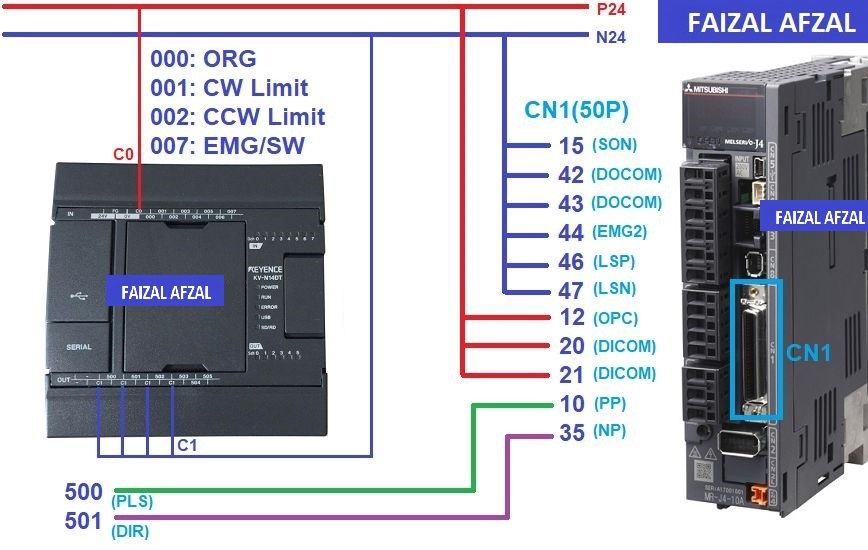
The connection diagram between the KV Nano PLC and the MR-J4-A Servo Motor, highlighting the wiring for power, I/O, and communication lines.
1.2 Connection Details
- Power Supply: Ensure that both the KV Nano PLC and the MR-J4-A Servo Motor are connected to a stable power source, with the correct voltage levels as specified by their manuals.
- I/O Connections: Wire the pulse output and direction signals from the PLC to the servo motor’s respective inputs. Ensure that the wiring matches the designated I/O addresses in the PLC program.
- Communication Lines: If using any communication protocols (such as RS-232/485), ensure proper connection between the PLC and servo driver.
Step 2: Configuring the Keyence KV Nano PLC Parameters
2.1 Overview of KV Nano Configuration
The Keyence KV Nano PLC, though compact, is powerful and capable of controlling servo motors with precision. To ensure smooth operation, it is essential to configure the PLC parameters correctly.
2.2 Basic Parameter Configuration
For users new to the KV Nano, it is recommended to follow a simplified configuration process to get started. Below are the steps and settings to configure the KV Nano for controlling the MR-J4-A Servo Motor:
- Port Configuration: Assign the correct ports for pulse output and direction control. This is critical for ensuring the servo motor receives the correct movement commands.
- Pulse Output Settings: Set up the PLC to output pulses at the desired frequency and amplitude, matching the requirements of the MR-J4-A servo driver.
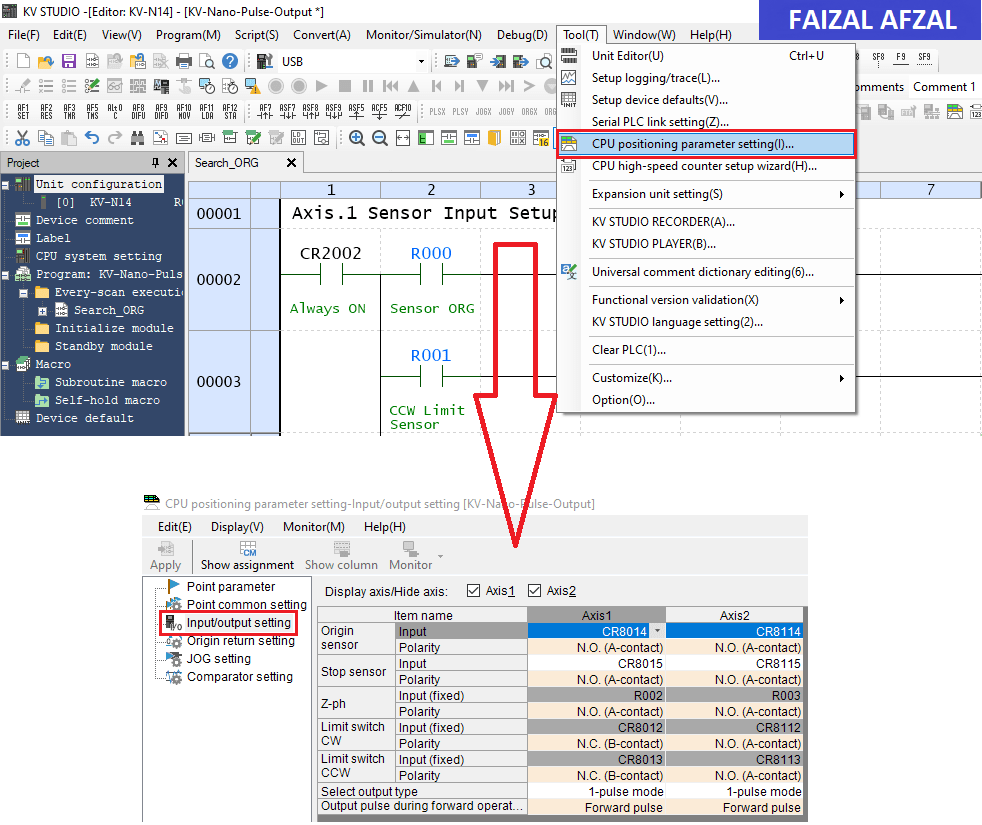
The KV Nano parameter configuration screen, highlighting the pulse output and direction control settings
Step 3: Configuration of Mitsubishi MR-J4-A Servo Driver
3.1 Overview of MR-J4-A Configuration
The Mitsubishi MR-J4-A Servo Motor requires precise configuration to operate correctly with the Keyence KV Nano PLC. There are five main parameters that you need to set to ensure compatibility and smooth operation.
3.2 Key Parameters for MR-J4-A
The following parameters should be configured either directly on the MR-J4-A driver or through the MR-Configurator2 software:
- PA01: Servo Control Mode Selection
- Value: Set to
1000. - Purpose: This setting selects the position control mode, enabling the servo to move to precise positions based on input pulses.
- Value: Set to
- PA05: Number of Command Input Pulses per Revolution
- Value: Set to
1000 PLS / 1 REV. - Purpose: Determines the number of pulses required for one full revolution of the servo motor, ensuring accurate positioning.
- Value: Set to
- PA06/PA07: CMX / CDV (Input Pulse Gain Ratio)
- Default Value:
1/1. - Purpose: Adjusts the number of pulses per revolution, matching the pulse output from the PLC to the servo motor’s expected input. This ratio corresponds to
131072 pulses/revas the default.
- Default Value:
- PA13: PLSS (Selection of Control Pulse Types)
- Default Value:
0100. - Purpose: Configures the pulse input type used by the servo motor. Adjust these settings to match the specific control pulse method used by the PLC.
- Default Value:
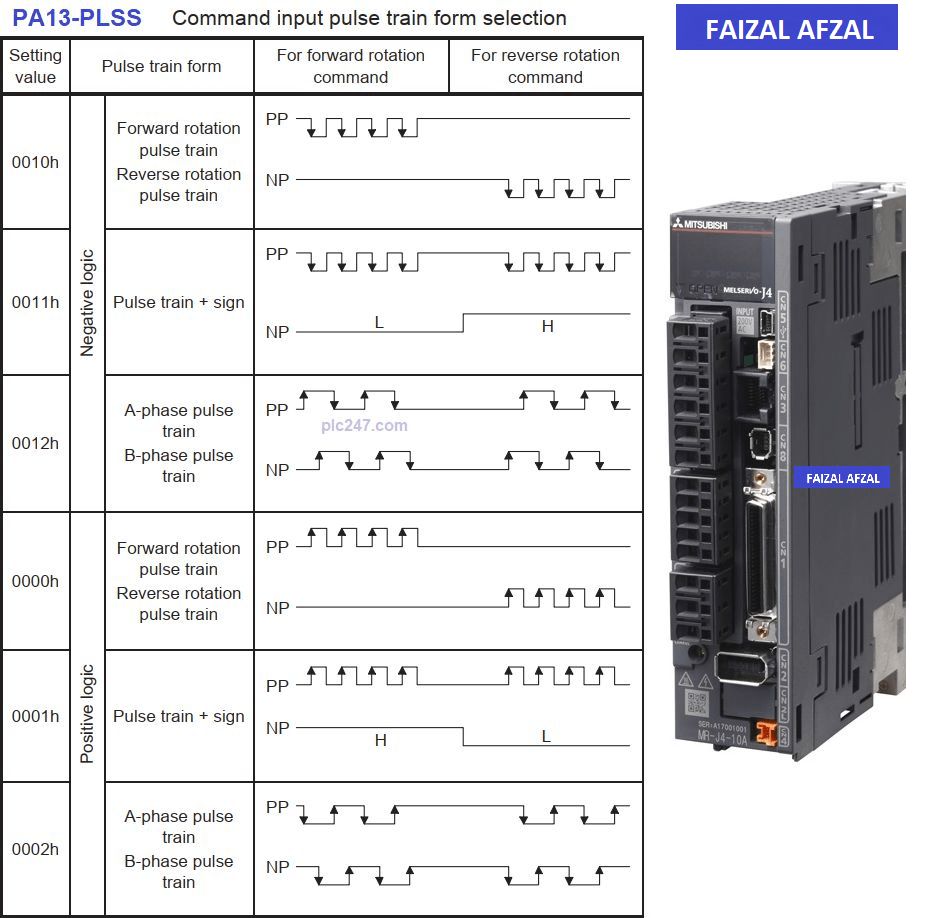
Table here showing the different Control Pulse Types
Step 4: PLC Programming in KV Studio Software
4.1 Overview of PLC Programming
Programming the Keyence KV Nano PLC to control the Mitsubishi MR-J4-A Servo Motor involves setting up the logic to manage pulse output, direction control, and executing the Origin Search (ORG) process. The KV Studio software is used to write and upload the necessary program to the PLC.
4.2 Sensor Input Setup & Axis 1 Stop Pulse Output
In this section of the program, you will configure the sensor inputs and set up the logic to stop pulse output under specific conditions, such as reaching a limit or detecting an error.
- Sensor Input Setup: Define the input addresses for the sensors connected to the KV Nano. This includes limit sensors and the origin sensor.
- Stop Pulse Output: Implement the logic to immediately halt pulse output if a critical condition is met (e.g., limit sensor activation or emergency stop).
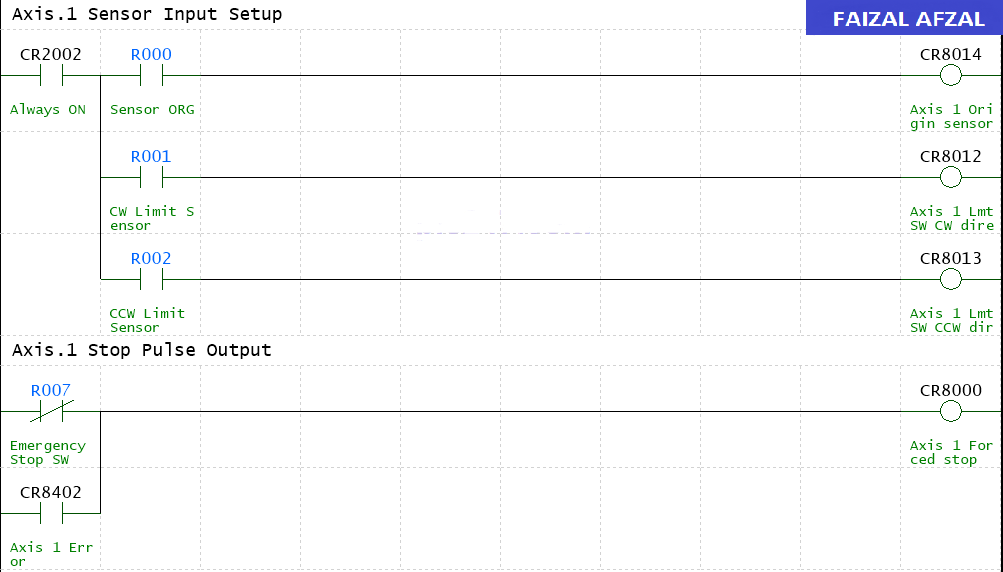
The ladder logic code that handles the sensor inputs and stop pulse output in the KV Studio software
4.3 Origin Recovery Process
The Origin Recovery Process is a critical step in ensuring that the servo motor returns to its home or origin position accurately. This section of the program will handle the logic for executing the ORG command, which moves the servo to its predefined origin.
- ORG Command Execution: Use the ORG command to initiate the search for the origin. Ensure that the program correctly identifies when the motor has reached its origin and stops the movement.
- Pulse Count Reset: Once the origin is found, the program will reset the pulse count to zero, ensuring that all subsequent movements are accurately tracked.
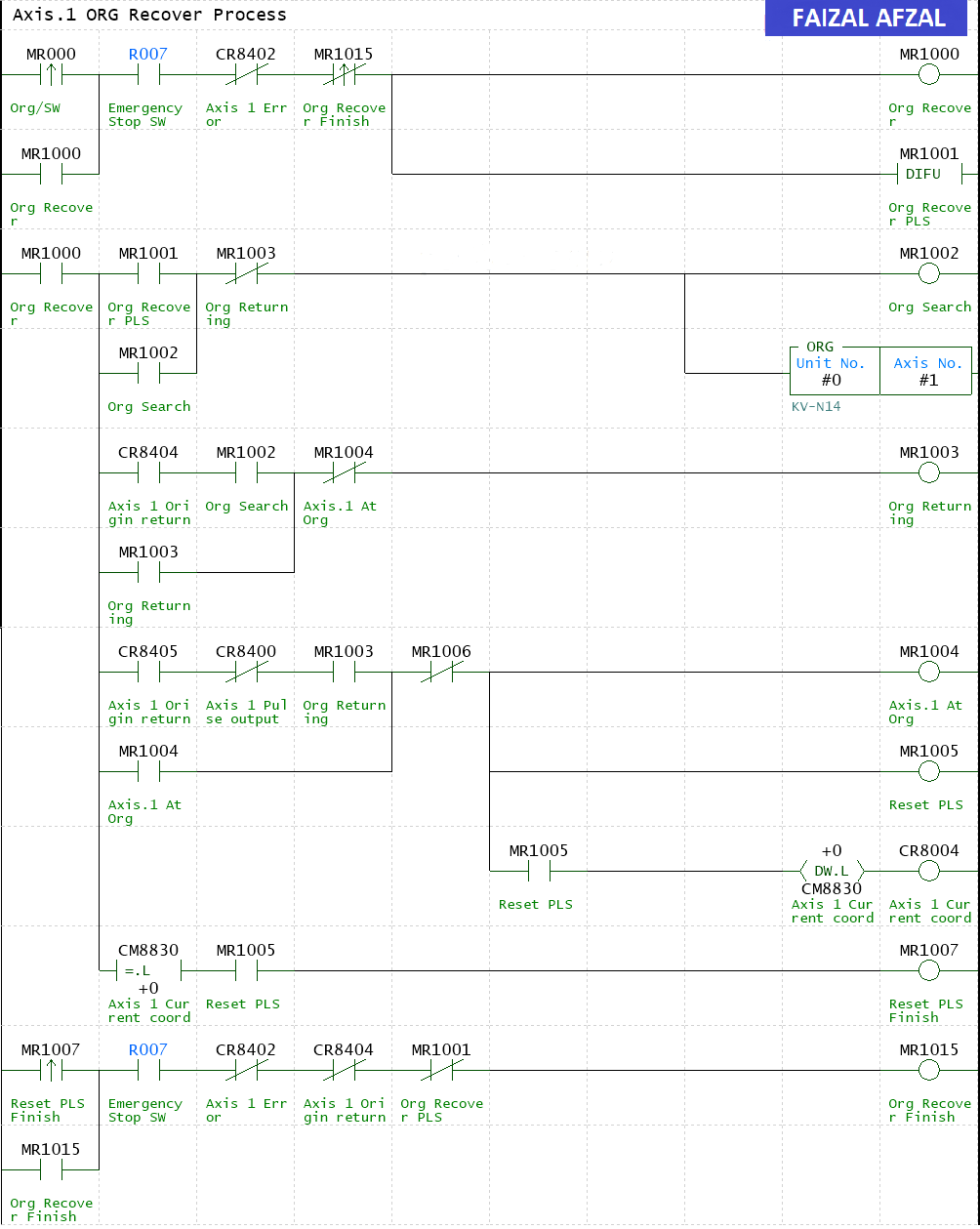
Code example showing the ORG command logic in the KV Studio software
Conclusion
This tutorial provided a detailed guide on connecting and programming the Keyence KV Nano PLC to control the Mitsubishi MR-J4-A Servo Motor, focusing on the Origin Search (ORG) process. By following these steps, you can achieve precise motion control in your industrial applications, ensuring that the servo motor always starts from a known position and operates reliably.
For those looking to expand their knowledge, consider exploring more advanced features of the KV Nano PLC or integrating additional sensors and safety mechanisms into your control system.
For further assistance or more detailed information, please refer to the Mitsubishi manuals or contact a Mitsubishi Electric support representative.