Keyence KV5500 & Mitsubishi MR-J4-A Servo “Origin Search” (ORG)
Written by FAIZAL AFZAL
Introduction
This tutorial provides a detailed guide on controlling the Mitsubishi MR-J4-A Servo Motor using the Keyence KV5500 PLC. Both Keyence and Mitsubishi are renowned brands in the automation industry, offering high-performance solutions for precision control in various industrial applications. The focus of this tutorial is to demonstrate how to connect and configure the KV5500 to drive the MR-J4-A Servo motor, with particular emphasis on the “Origin Search” (ORG) process.
Step 1: Configuration of Keyence KV5500 PLC
1.1 Overview of KV5500 Configuration
The Keyence KV5500 PLC is a versatile controller that can be integrated with various servo systems, including the Mitsubishi MR-J4-A. The configuration for the KV5500 when connecting to the MR-J4-A will closely mirror the settings used for the Yaskawa Sigma V Servo, making it a familiar process for those with experience in similar setups.
1.2 CPU KV5500 Setting Parameters
To begin the configuration, ensure that the following parameters are set correctly in the KV5500 CPU:
Step 1: Basic Setup
- Input/Output Assignment: Ensure that the correct I/O addresses are assigned to handle the pulse and direction signals for the servo motor. The exact addresses will depend on your specific setup.
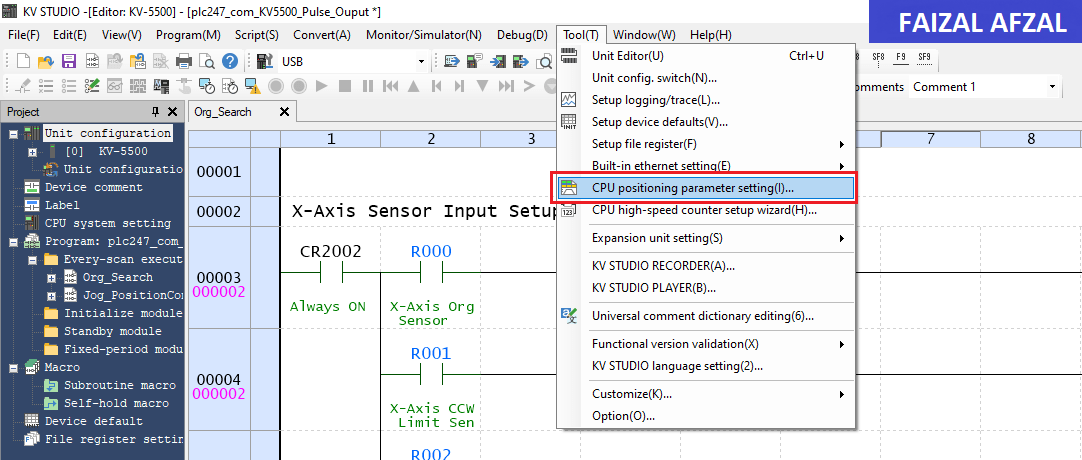
The KV5500 CPU configuration screen, highlighting the Direction method setup
Step 2: Pulse Output Configuration
- Pulse + Direction Method: Set up the KV5500 to use the Pulse + Direction method for controlling the servo motor. This setup will allow the PLC to send a pulse train to control the movement and a separate signal to determine the direction (clockwise or counterclockwise) of the motor.
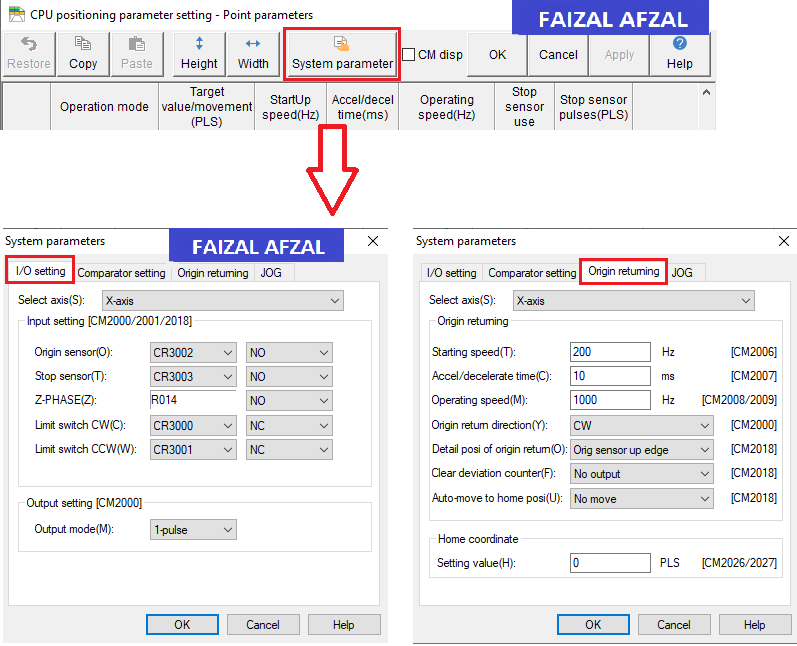
The KV5500 CPU configuration screen, highlighting the I/O settings and Pulse
Step 2: Configuring Mitsubishi MR-J4-A Servo Driver
2.1 Overview of MR-J4-A Configuration
The Mitsubishi MR-J4-A Servo Motor requires precise configuration to work seamlessly with the Keyence KV5500 PLC. There are five critical parameters that need to be set on the servo driver to ensure proper operation.
2.2 Key Parameters for MR-J4-A
The following parameters should be configured either directly on the MR-J4-A driver or through the MR-Configurator2 software:
- PA01: Servo Control Mode Selection
- Value: Set to
1000. - Purpose: This setting selects the position control mode, enabling the servo to move to precise positions based on input pulses.
- Value: Set to
- PA05: Number of Command Input Pulses per Revolution
- Value: Set to
1000 PLS / 1 REV. - Purpose: Determines the number of pulses required for one full revolution of the servo motor, ensuring accurate positioning.
- Value: Set to
- PA06/PA07: CMX / CDV (Input Pulse Gain Ratio)
- Default Value:
1/1. - Purpose: Adjusts the number of pulses per revolution, matching the pulse output from the PLC to the servo motor’s expected input. This ratio corresponds to
131072 pulses/revas the default.
- Default Value:
- PA13: PLSS (Selection of Control Pulse Types)
- Default Value:
0100. - Purpose: Configures the pulse input type used by the servo motor. Adjust these settings to match the specific control pulse method used by the PLC.
- Default Value:
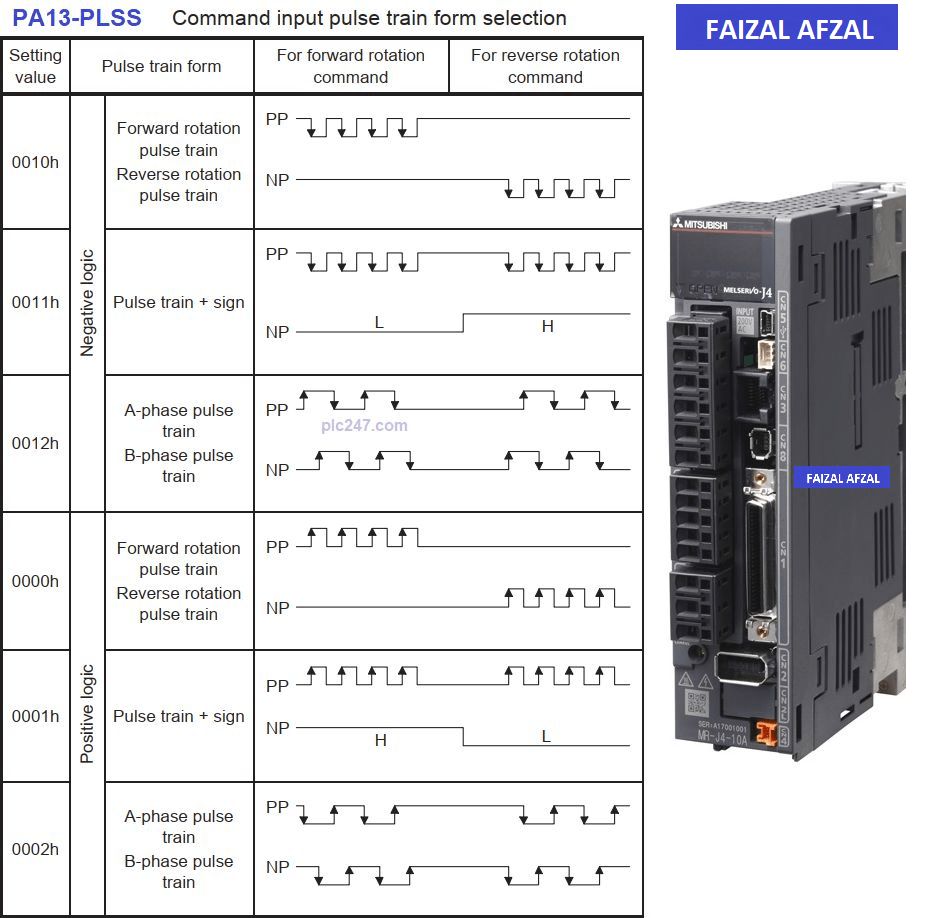
Table here showing the different Control Pulse Types
Step 3: Connection Diagram Between Keyence KV5500 and Mitsubishi MR-J4-A
Establishing a reliable connection between the Keyence KV5500 PLC and the Mitsubishi MR-J4-A Servo Motor is crucial for the system to function correctly. Below is the simplest wiring diagram to facilitate this connection, making it easier for users to understand and implement.
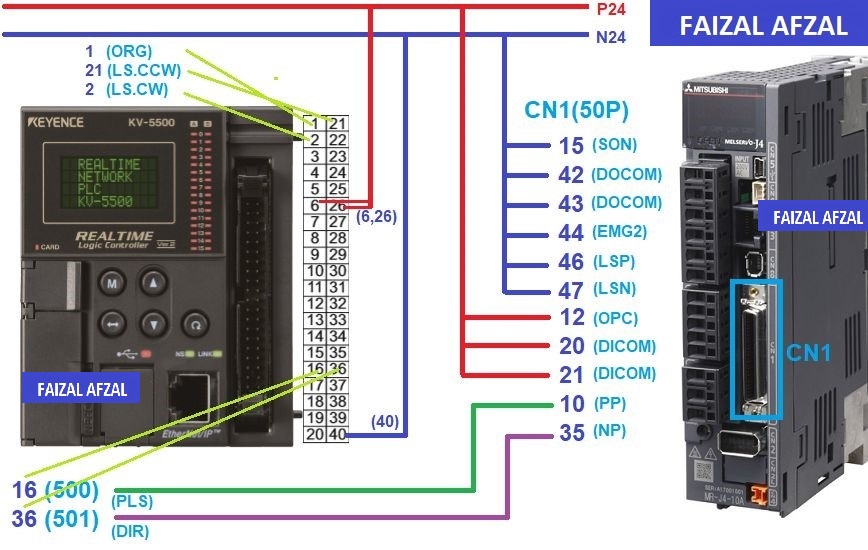
Wiring diagram here that illustrates the connections between the KV5500 PLC and the MR-J4-A servo motor, including power connections, I/O wiring, and communication lines
Step 4: Programming the Keyence KV5500 PLC
4.1 Introduction to Programming
With the hardware configuration complete, the next step involves programming the Keyence KV5500 PLC to control the Mitsubishi MR-J4-A Servo Motor. The programming will cover essential operations such as I/O handling, pulse output control, and executing the Origin Search (ORG) process.
4.2 Section: I/O Programming and Stop Pulse Output
In this section, the program handles the basic I/O operations and controls the pulse output to the servo motor. The program ensures that pulse signals are correctly sent to the MR-J4-A based on the desired motion commands. It also includes safety features such as stopping pulse output during emergency situations or when specific conditions are met.
- I/O Programming: Define and assign the necessary I/O addresses for the pulse and direction outputs.
- Stop Pulse Output: Implement logic to immediately stop the pulse output under certain conditions, such as an emergency stop or limit sensor activation.
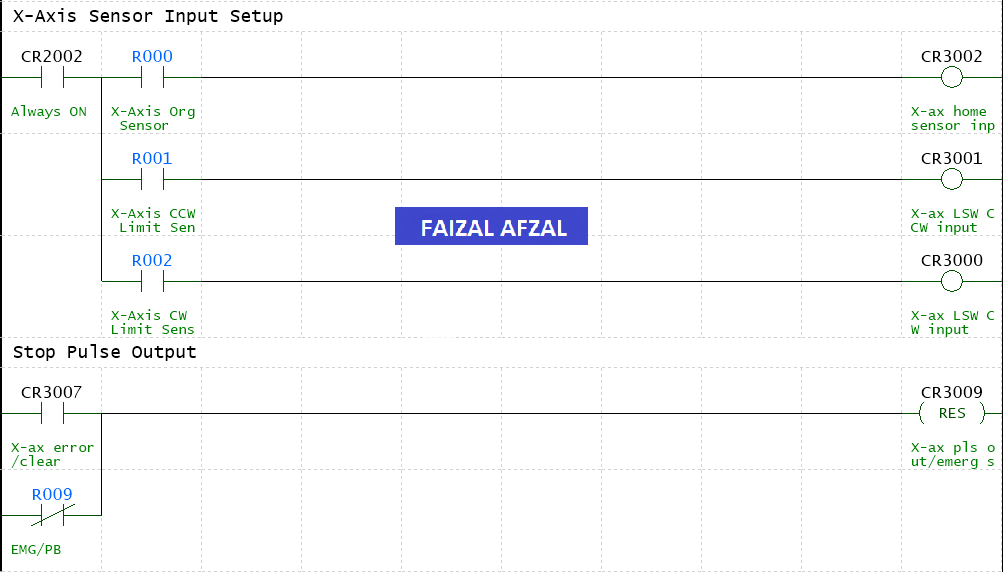
The ladder logic programming for the I/O and Stop Pulse Output sections in the Keyence KV5500
4.3 Section: ORG (Origin Search) Process
The ORG process is critical for ensuring that the servo motor starts from a known position. This section of the program will execute the Origin Search command, moving the servo motor to its home or origin position.
- ORG Command: Use the ORG command to initiate the search for the origin. This command ensures that the servo motor moves to the predefined home position before starting any other operations.
- Pulse Count Reset: Once the origin is found, the program will reset the pulse count to zero, ensuring that all subsequent movements are accurately tracked.
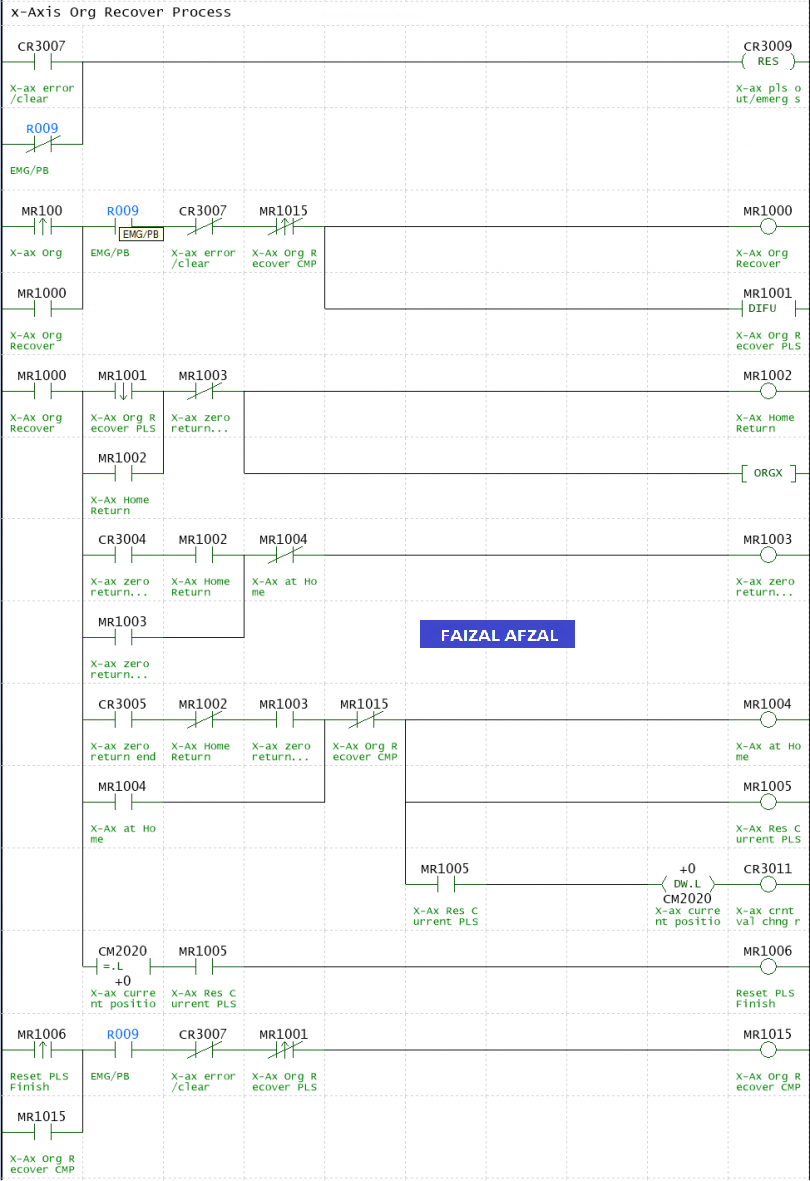
Code example showing the ORG command programming in the Keyence KV5500
Conclusion
This tutorial has provided a step-by-step guide on how to connect and program the Keyence KV5500 PLC to control the Mitsubishi MR-J4-A Servo Motor, with a particular focus on the Origin Search (ORG) operation. By following these steps, users can achieve precise motion control in their industrial applications, ensuring that the servo motor always starts from a known position and operates efficiently.
For those looking to explore further, consider diving into more advanced programming techniques or integrating additional sensors and safety features to enhance your control system.
For further assistance or more detailed information, please refer to the Mitsubishi manuals or contact a Mitsubishi Electric support representative.